


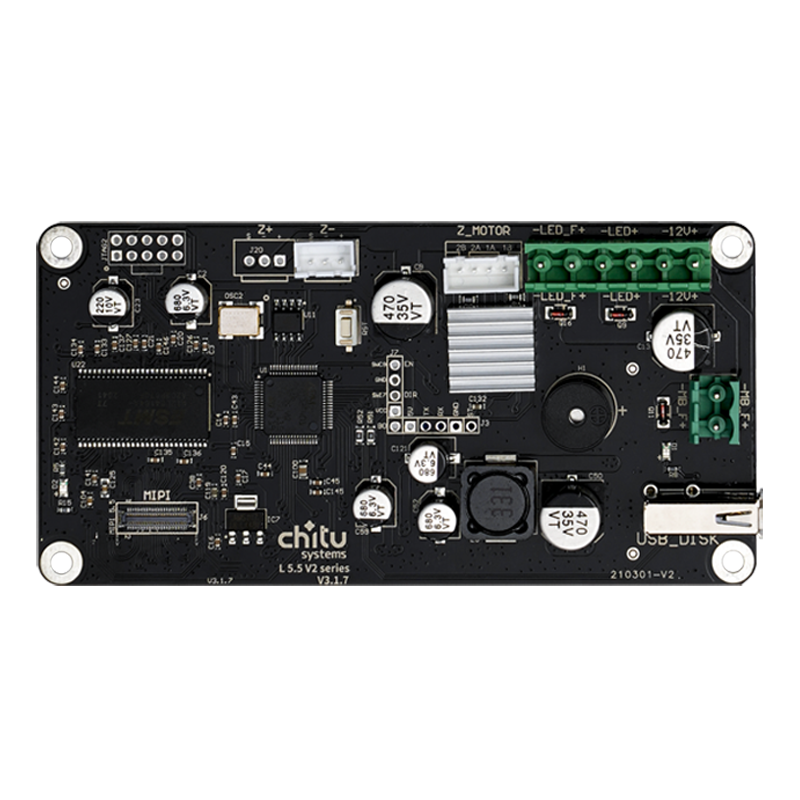


ChiTu L V2 Motherboard Replacement for ELEGOO Mars Series


ChiTu L V2 Mainboard for ELEGOO Mars Series
The ChiTu L V2 is a controller board for selected ELEGOO Mars-series LCD resin 3D printers. It is intended for compatible motherboard replacement and certain LCD upgrade configurations, provided the screen, connectors, wiring, and firmware are correctly matched.
Motherboard Replacement
Replace a faulty controller board in a compatible Mars-series printer.
RGB & Mono LCD Options
Supports selected LCD configurations with the correct interface and firmware.
DIY & Upgrade Projects
Useful for compatible screen upgrades that require a V2 controller board.
Before you buy: A printer model name alone does not guarantee a plug-and-play fit. Check the model/revision printed on your existing board, the exact LCD panel, connectors, wiring, and required firmware.
Product Photos


Compatible Printer Models
The original product listing identifies the following ELEGOO printers. Compatibility still depends on the individual printer's hardware revision and LCD setup.
| Printer | What to verify |
|---|---|
| ELEGOO Mars | Some early units use an L5.5-10.1 board. Check the original board revision and whether additional parts or firmware are needed. |
| ELEGOO Mars Pro | Check the original board revision, LCD model, connector, and firmware before replacement or an LCD upgrade. |
| ELEGOO Mars 2 | Confirm the installed V2 board configuration, LCD panel revision, and matching firmware. |
| ELEGOO Mars 2 Pro | Confirm the installed V2 board configuration, LCD panel revision, and matching firmware. |
Printer names are taken from the existing product listing. This is not a promise of compatibility across every manufacturing batch.
V2 LCD Compatibility Reference
The following LCD categories were marked as supported by V2 in the original ChiTu Systems comparison chart. The exact LCD part number and matching FPGA firmware must be verified before installation.
| LCD Type | Resolution | Listed Interface |
|---|---|---|
| 5.5-inch RGB LCD | 1440 × 2560 | MIPI/04 |
| 5.5-inch Mono LCD | 1080 × 1920 | MIPI |
| 6.08-inch Mono LCD | 1620 × 2560 | MIPI/04 |
| 6.23-inch Mono LCD | 3840 × 2400 | MIPI |
Important: LCD size or resolution alone is not enough to confirm compatibility. For example, the original chart lists the 5.5-inch 2K RGB MIPI/03 variant for V1, not V2. Do not connect an unverified LCD cable or apply firmware intended for another motherboard/screen combination.
How to Check Compatibility Before Ordering
Check Your Printer
- Confirm the exact printer model.
- Identify the original motherboard model and hardware revision.
- Check the LCD part number, resolution, and cable/interface type.
- Check that mounting points, power connectors, and other wiring are suitable.
Check the Firmware
- Identify the firmware required by your specific V2 board and LCD combination.
- Follow the official installation/update instructions.
- Recheck printer settings and LCD operation after installation.
- If unsure, contact ChiTu Systems support before connecting the board.
For Mars / Mars Pro monochrome upgrade projects, some early original motherboards must be replaced with a compatible V2 board; a motherboard change alone may not provide all components required for a complete LCD conversion.
Firmware & Setup Resources
Use the documentation for your exact printer and LCD combination. Different panels may require different FPGA firmware, and a monochrome upgrade may also require updated machine settings in CHITUBOX.
Frequently Asked Questions
Is the ChiTu L V2 motherboard compatible with every ELEGOO Mars printer?
No. The listing includes Mars, Mars Pro, Mars 2 and Mars 2 Pro, but different production batches may use different motherboard revisions, LCD panels, connectors, or firmware. Verify your hardware before ordering.
Can I replace the original motherboard in an early ELEGOO Mars or Mars Pro?
Some early printers use the L5.5-10.1 motherboard instead of a compatible V2/C board. A V2-based replacement or mono LCD upgrade may require additional parts, wiring checks, firmware, and machine configuration. It should not be treated as an automatic drop-in swap.
Does the V2 board support both RGB and monochrome LCD screens?
The original compatibility chart lists selected RGB and monochrome LCD categories for V2. Support depends on the exact screen model, connector version, resolution, and matching FPGA firmware.
Can I use this board to upgrade my Mars or Mars Pro to a mono LCD?
A compatible V2 board can be part of certain monochrome screen upgrade configurations. The complete upgrade may also require the appropriate LCD, mounting accessories, firmware, and updated printer settings. Check the official Mars upgrade guide for your setup.
Does the board require a firmware update?
It may. Firmware must match the board, LCD model, and printer configuration. Screen replacements or mono LCD upgrades can require a different FPGA firmware file. Use the applicable official instructions before updating.
Which slicing software should I use?
ChiTu controller configurations use CHITUBOX workflows. After certain board replacements or upgrade-kit installations, print files must be exported in .ctb format, and the machine profile may need to be updated.
Is an LCD screen included with this motherboard?
This product is listed as a motherboard. Do not assume an LCD screen, touchscreen, cables, or upgrade accessories are included unless they are expressly shown in the selected product variant or package contents.
Is this motherboard compatible with ELEGOO Mars 3 or newer Mars models?
Those models are not listed in the original product's stated printer compatibility. Please contact support with your original motherboard and LCD part number rather than assuming compatibility.
Need Help Choosing the Right Board?
If you are unsure whether the ChiTu L V2 matches your printer, please contact ChiTu Systems Support with your printer model and clear photos of the original motherboard label and LCD connector. This helps avoid ordering a board or firmware that does not match your printer.

Select an option, then tap Add to Cart.