


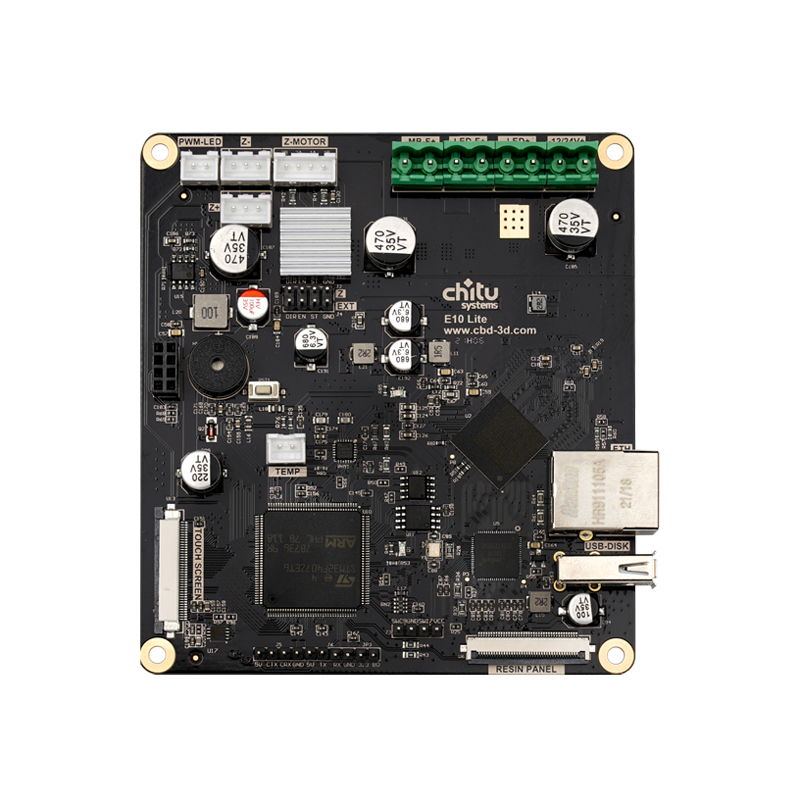


ChiTu E10 Lite Mainboard for 6K–8K LCD Resin 3D Printers


Control Your Large-Format LCD Resin Printer Build
The ChiTu E10 Lite is a controller mainboard for selected high-resolution monochrome LCD resin printing configurations. It is intended for compatible custom builds and printer modification projects—not as a universal plug-and-play replacement.
- Supports selected eDP monochrome LCD configurations from 10.1 to 15.0 inches.
- Store firmware variants include 6K, 7K and 8K LCD options.
- Choose the version that matches your exact LCD resolution and hardware configuration.

Before you buy: Confirm the LCD part number, resolution, eDP connector and cable pinout, touchscreen, UV light source, board mounting space and matching firmware. LCD size or resolution alone does not guarantee compatibility.
E10 Lite LCD Compatibility
The six LCD configurations below are marked for E10 Lite in the original ChiTu Systems compatibility chart. These are screen-level references, not a guarantee that an entire printer can accept this motherboard without modification.
| Mono LCD Size | Resolution | Interface | Store Firmware Option |
|---|---|---|---|
| 10.1-inch | 4920 × 2880 | eDP | Confirm with support |
| 10.1-inch | 7680 × 4320 | eDP | 10.1-inch Mono 8K |
| 12.8-inch | 5448 × 3064 | eDP | 12.8-inch Mono 6K |
| 13.3-inch | 5760 × 3240 | eDP | Confirm with support |
| 13.6-inch | 6480 × 3600 | eDP | 13.6-inch Mono 7K |
| 15.0-inch | 7680 × 4320 | eDP | 15.0-inch Mono 8K |
Important: The compatibility chart gives screen sizes, resolutions and interface types, but not exact LCD part numbers. Two listed configurations (10.1-inch 4920 × 2880 and 13.3-inch 5760 × 3240) are not shown among the current selectable firmware variants; please contact support before ordering for either setup.
How to Choose the Right Firmware Option
Step 1: Check Your Resin-Curing LCD
Find the LCD part number, diagonal size, resolution and eDP interface information. If possible, photograph the LCD label and connector.
Step 2: Match the Firmware Variant
Select the corresponding 10.1-inch 8K, 12.8-inch 6K, 13.6-inch 7K or 15.0-inch 8K option. If your panel differs, confirm compatibility with support first.
The firmware selector is for the resin-curing LCD configuration. Selecting a firmware option does not mean that an LCD screen, touchscreen, light source or cable is included in the package.
Anycubic Photon M3 Max Modification Notice
Not a direct drop-in replacement. According to the original product notice, the original UV light source, control touchscreen and LCD screen cable of the Anycubic Photon M3 Max are not compatible with the E10 Lite.
For an M3 Max modification project, these three parts must be replaced. You must also verify the LCD panel, wiring, mounting space and compatible firmware before installation. This page does not guarantee a complete M3 Max conversion using the motherboard alone.
Technical Overview
| Product | ChiTu E10 Lite Mainboard |
|---|---|
| Application | Selected high-resolution LCD resin 3D printer configurations |
| LCD Display Type | Monochrome LCD (specific supported configurations only) |
| LCD Signal Interface | eDP for the LCD configurations listed above |
| Listed LCD Sizes | 10.1, 12.8, 13.3, 13.6 and 15.0 inches |
| Selectable Firmware Variants | 10.1-inch 8K / 12.8-inch 6K / 13.6-inch 7K / 15.0-inch 8K |
| Printer Compatibility | Depends on exact LCD, firmware, touchscreen, light source, cables and wiring |
The source listing does not provide a verified processor model, board dimensions, power input or a complete package list. These values have not been added without documentation.
Additional Mainboard View

Installation Checklist
- Disconnect power before modifying the printer or connecting cables.
- Verify the LCD panel and eDP cable pinout. Do not connect a cable based on connector shape alone.
- Confirm the touchscreen and light source are compatible with your specific project.
- Use the matching firmware. Do not flash firmware intended for another LCD or motherboard configuration.
- Check mounting space and all wiring before applying power; test the machine's functions before attempting a print.
For firmware update procedures and troubleshooting, see the official firmware update instructions. Contact support for the correct E10 Lite firmware for your LCD model.
Frequently Asked Questions
What is the ChiTu E10 Lite mainboard used for?
It is a resin 3D printer controller board intended for selected high-resolution monochrome LCD configurations, including compatible large-format DIY and modification projects.
Which LCD screens are listed as compatible with E10 Lite?
The original compatibility chart lists six eDP monochrome LCD configurations: 10.1-inch 4920 × 2880, 10.1-inch 7680 × 4320, 12.8-inch 5448 × 3064, 13.3-inch 5760 × 3240, 13.6-inch 6480 × 3600 and 15.0-inch 7680 × 4320. Exact LCD part numbers and matching firmware still need to be confirmed.
Does the E10 Lite support MIPI LCD screens?
The LCD configurations marked as compatible with E10 Lite in the original chart all use eDP. Do not assume a MIPI LCD is compatible.
Can I directly replace the motherboard in an Anycubic Photon M3 Max?
No. The original product notice states that the M3 Max's light source, touchscreen and LCD cable are not compatible with E10 Lite and must be replaced for a modification project. Other compatibility checks are also required.
How do I select the correct firmware option?
Match the selected firmware to the resin-curing LCD's actual model, resolution and connection type. The currently listed store options are 10.1-inch 8K, 12.8-inch 6K, 13.6-inch 7K and 15.0-inch 8K. Ask support before buying if your LCD differs.
Why are 10.1-inch 4920 × 2880 and 13.3-inch 5760 × 3240 not in the variant menu?
Both configurations appear in the original compatibility chart, but are not listed as current firmware choices on the store product page. Please confirm availability and the appropriate firmware with support before ordering.
Does this product include an LCD, touchscreen, light source or cable?
The current product information does not establish that those components are included. Check the selected variant and package contents with support before ordering; do not assume accessories come with the mainboard.
Is matching screen size enough to confirm compatibility?
No. You must also verify the exact LCD part number, resolution, eDP connector and cable wiring, matching firmware, touchscreen, light source and physical installation space.
Where can I get help confirming compatibility?
Contact ChiTu Systems Support with your printer model, current mainboard photos, LCD part number, cable photos and the firmware configuration you intend to use.
Documentation & Support
Firmware update guide · ChiTu touchscreen compatibility guide · ChiTu Systems Support Center
Unsure which configuration to buy? Email support@cbd-3d.com with photos of your current components for a compatibility check.

Select an option, then tap Add to Cart.