


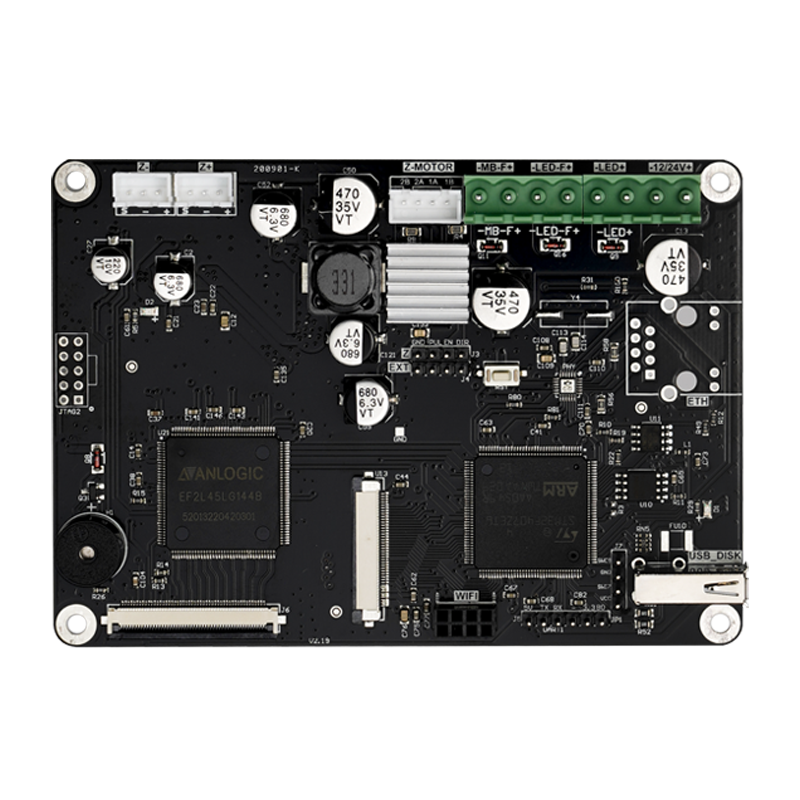


ChiTu L K1 TMC2209 Controller Board for 8.9″ & 10.1″ 2K LCD Printers


A Controller Board for Compatible 8.9" & 10.1" 2K LCD Setups
The ChiTu L K1 is a 32-bit motherboard for selected LCD/mSLA resin 3D printer builds and repairs. It combines an STM32F407 processor with a TMC2209 motor driver and is offered with 8.9-inch or 10.1-inch 2K LCD firmware configurations.
- TMC2209 motor driver for Z-axis motor control in compatible printer builds.
- 8.9" 2K and 10.1" 2K firmware options on the current product page.
- CHITUBOX and .ctb file format support.
- Optional ChiTu TFT touchscreen in several sizes.

Before ordering: Match your LCD's exact part number, panel technology (Mono or RGB), resolution, interface, cable pinout and corresponding firmware. An 8.9-inch or 10.1-inch screen is not automatically compatible just because its size matches a product option.
LCD Compatibility & Firmware Selection
The options currently sold for the K1 are based on the 8.9-inch 2K and 10.1-inch 2K LCD configurations. These are firmware choices, not guarantees of compatibility with all same-size LCD panels.
| LCD Configuration | Current Firmware Option | What to Check |
|---|---|---|
| 8.9" 2K LCD | 8.9 2K | LCD model, Mono/RGB type, connector and firmware |
| 10.1" 2K LCD | 10.1 2K | LCD model, Mono/RGB type, connector and firmware |
The older multi-board compatibility chart also shows certain 5.96-inch monochrome and 6.0-inch RGB panels under K1. However, no matching 5.96/6.0-inch firmware choice is currently shown on this product page; contact support before planning either configuration.
Important LCD compatibility notice: Compatible LCD types depend on the exact panel model and firmware. Do not assume that every 8.9-inch or 10.1-inch Mono or RGB panel is supported. Confirm your screen model and connector wiring with ChiTu Support before connecting it; an incompatible LCD may damage the controller board.
How to Choose Your K1 Configuration
Step 1: Firmware Option
Choose 8.9 2K or 10.1 2K according to your resin-curing LCD, not the small control touchscreen. Verify the exact LCD model and required FPGA firmware before ordering.
Step 2: Touch Screen Size
Choose Only Board or a bundle with the ChiTu 2.8", 3.5", 4.3" or 5.0" TFT touchscreen. This is the printer's control panel, not the resin-curing LCD.
Firmware downloads: The original listing states that FPGA firmware accompanies the board and can be updated. See the ChiTu L K1 firmware download folder. Never install firmware intended for a different LCD or motherboard revision.
Technical Specifications
| Model | ChiTu L K1 |
|---|---|
| Motherboard Dimensions | 120 × 85 mm |
| Microprocessor | STM32F407, 32-bit (up to 168 MHz processor clock specification) |
| Input Voltage | 12–24 V DC |
| Power Specification | 5–15 A listed in original product information; confirm requirements for your build |
| Motor Driver | TMC2209 |
| Control Touchscreen | Optional 2.8" / 3.5" / 4.3" / 5.0" ChiTu TFT |
| Current LCD Firmware Options | 8.9" 2K / 10.1" 2K |
| Data Interfaces | USB flash drive and network port |
| Slice File Format | .ctb |
| Slicing Software | CHITUBOX |
What's Included
Controller Board Only
ChiTu L K1 controller motherboard; complimentary items as listed with the selected package.
Controller Board + TFT Touchscreen
ChiTu L K1 controller motherboard, selected 2.8" / 3.5" / 4.3" / 5.0" ChiTu TFT touchscreen and a 50 cm FFC cable; complimentary items as listed with the package.
The TFT touchscreen is the printer's user interface, not its resin-curing LCD. A resin-curing LCD is not listed as part of these packages. ChiTu-specific TFT touchscreens should not be assumed compatible with other control boards.
Installation & Power Safety
Disconnect power before wiring. Connect a compatible DC supply only to the terminals marked for 12–24 V, observing the board's positive and negative markings. Reverse polarity can permanently damage the motherboard. Do not power the board until LCD and motor wiring have been checked.
- Confirm your LCD's model number, interface and cable pinout before connecting it.
- Use firmware intended for the K1 and the exact LCD configuration.
- Verify physical mounting space and the Z-axis motor wiring for your specific printer.
- Use a compatible ChiTu touchscreen; third-party TFT panels may not work.
- After wiring, verify printer settings and LCD resolution in CHITUBOX before attempting a print.

For general update steps, consult the ChiTu firmware update guide. Confirm K1-specific files with support.
Frequently Asked Questions
What does the ChiTu L K1 motherboard do?
It is a controller board for selected LCD/mSLA resin 3D printer configurations. It coordinates the printer's LCD exposure workflow and Z-axis control and works with compatible .ctb print files.
Does the K1 support every 8.9-inch or 10.1-inch 2K LCD?
No. Matching the diagonal size is not enough. Verify the LCD's exact part number, Mono/RGB technology, signal interface, cable pinout and matching firmware before use.
Does the K1 support Mono LCD or RGB LCD screens?
The product is offered with 8.9-inch and 10.1-inch 2K firmware options, but support for a specific Mono or RGB panel must be confirmed by its exact LCD model, cable and firmware. Please contact ChiTu Support before ordering.
How do I choose between the 8.9 2K and 10.1 2K firmware options?
Select the option that matches the resin-curing LCD configuration, then confirm the actual LCD model and FPGA firmware. If you are unsure which panel is installed, contact support before ordering or flashing firmware.
What is the difference between Touch Screen Size and Firmware Option?
Touch Screen Size selects the optional 2.8/3.5/4.3/5.0-inch TFT control interface. Firmware Option concerns the larger resin-curing LCD and currently offers 8.9-inch 2K or 10.1-inch 2K configurations.
Does the package include the resin-curing LCD screen?
No resin-curing LCD is listed in the original package contents. Only Board includes the motherboard; touchscreen bundles add the selected TFT control panel and a 50 cm FFC cable, along with any specified complimentary items.
Can I install the K1 as a direct replacement in any resin printer?
No universal drop-in printer compatibility is established by this listing. Check the original motherboard, LCD connector, firmware, motor wiring, power input and physical mounting space before choosing the K1.
What software and files does the board support?
The product listing specifies CHITUBOX slicing software and the .ctb sliced file format.
Where can I find the K1 firmware?
See the firmware download folder. Always confirm that the firmware is intended for your K1 board and exact LCD before updating.
What details should I send for a compatibility check?
Email ChiTu Systems Support with the printer model, photos of the existing motherboard, the LCD panel label, the cable connector and the configuration you intend to build.
Firmware, Guides & Support
K1 firmware downloads · Firmware update instructions · How to choose an LCD screen
Questions about LCD compatibility? Contact support@cbd-3d.com before purchasing.

Select an option, then tap Add to Cart.